
Every part on a laser module answers a failure that would happen without it, What the seven pins do, why RF gets its own port, why the TEC locks wavelength, and what the isolator, PM fibre and angled connector each solve.
Read the description of a high-speed laser module and it usually arrives as a list of nouns: standard butterfly package, RF connector, internal thermoelectric cooler, isolator, polarisation-maintaining fibre pigtail, angled physical-contact connectors. It reads like a specification sheet. Behind every item, though, sits a specific failure mode — something that will go wrong if the part is not there.
This article takes the module apart and explains, item by item, what problem each part solves and why there is no cheaper substitute.
1. What the seven pins do
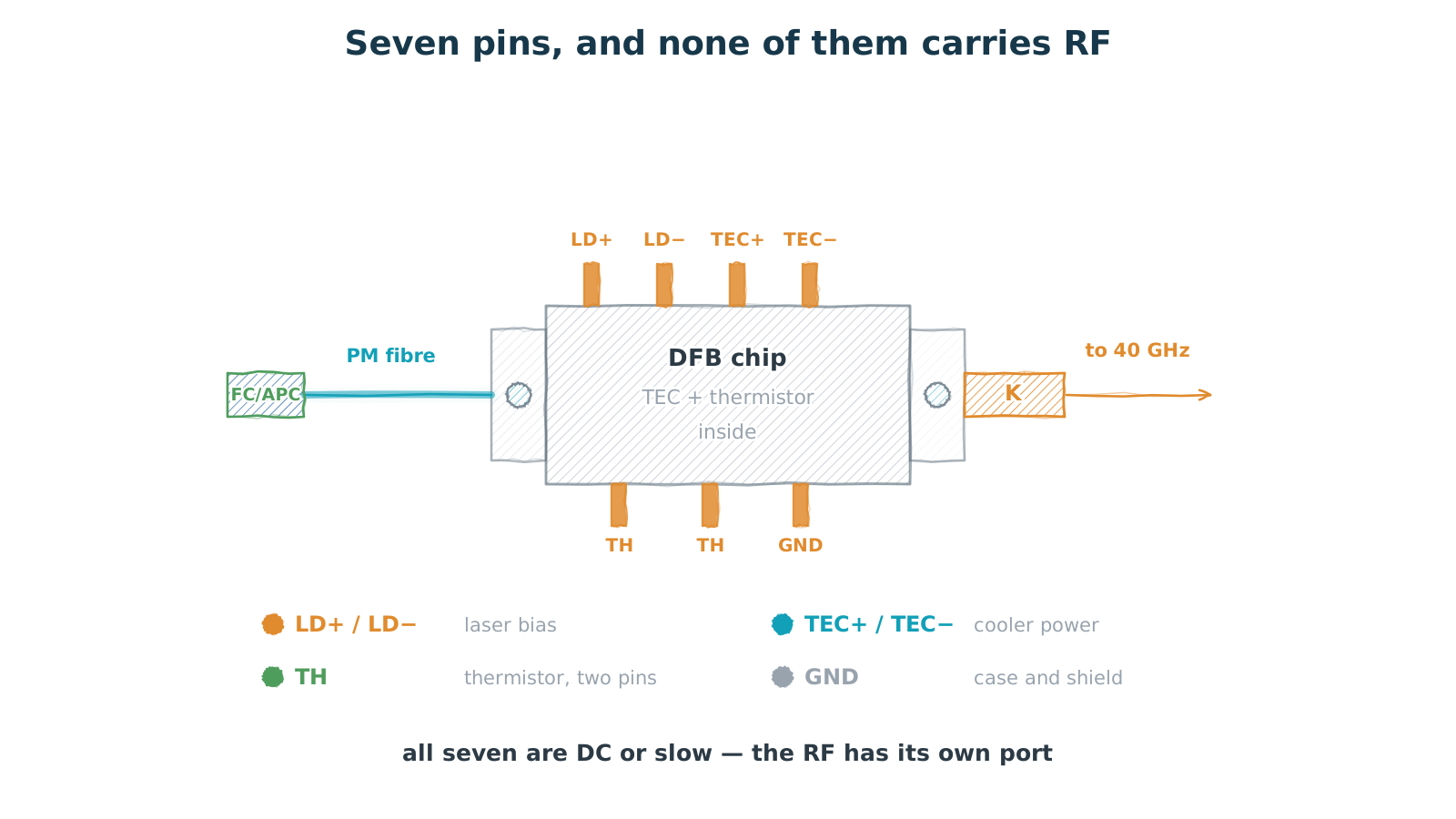
Figure 1 — Seven pins, and none of them carries RF
all DC or slow — the RF has its own port
Butterfly is a standardised form factor: a metal base carries heat away, flanges with mounting holes on two sides carry the mechanical load, and the pins run along the two long edges. Its value lies mostly in interchangeability — swap to another supplier in the same package and the PCB does not change, the fixture does not change, the thermal design does not change.
The pin assignment is conventional too. Two for laser bias, anode and cathode. Two for cooler power, positive and negative. Two for the two ends of the thermistor. One for case and shield.
The important point: all seven are DC or slow signals. Not one of them carries RF. That is not coincidence, and the next section explains why.
2. Why 30 GHz cannot travel on a pin
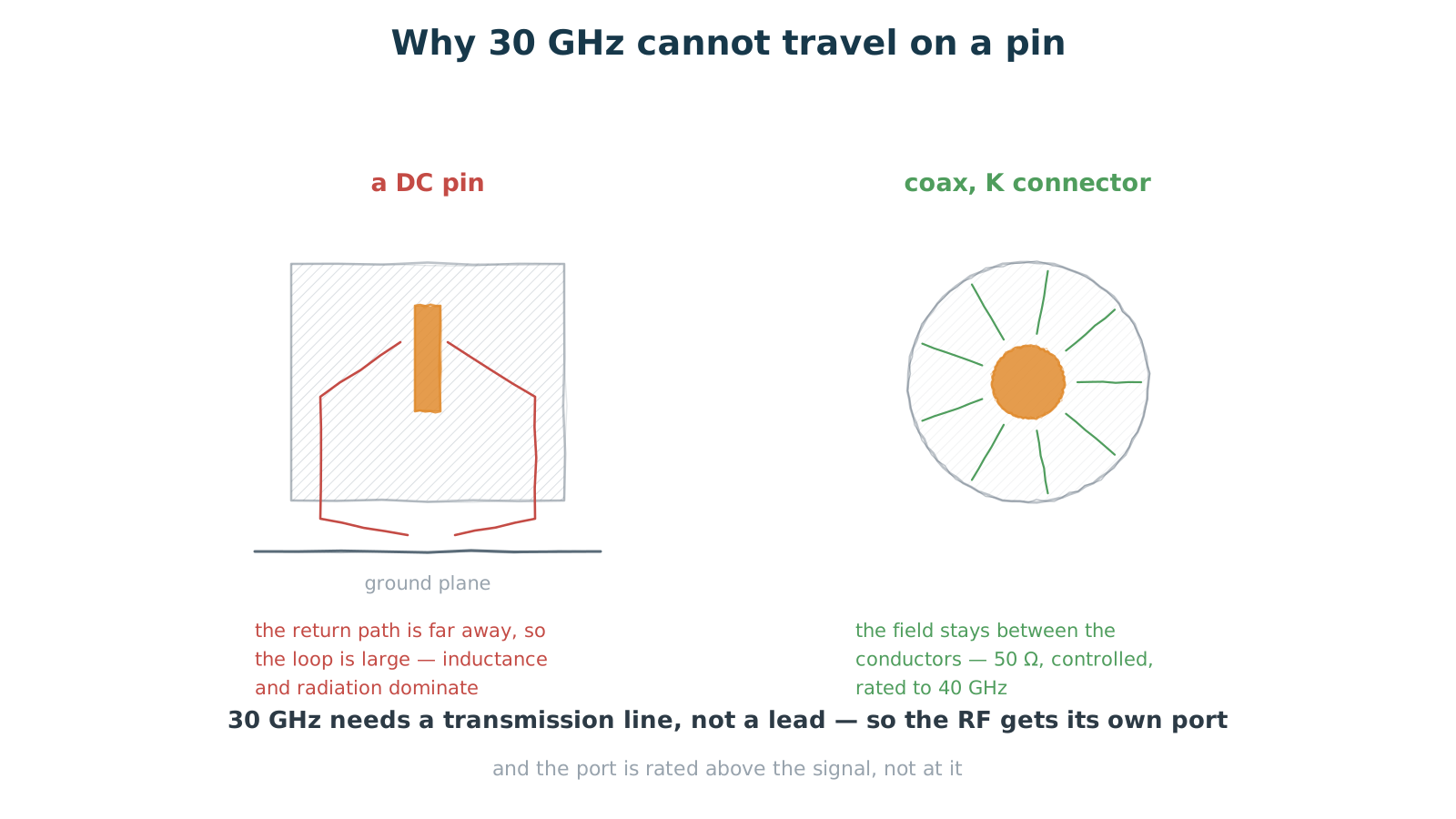
Figure 2 — Why 30 GHz cannot travel on a pin
a pin has no reference plane; coax does
A directly modulated laser runs at bandwidths in the 30 GHz region. A signal at that frequency cannot travel on a pin — not because the pin is poorly made, but because of transmission line structure.
A pin is an isolated metal stub whose return path sits on a distant ground plane. The loop enclosed by signal current and return current is large, so parasitic inductance grows, impedance stops being controlled, some of the energy radiates, and the rest couples into neighbouring pins. At 30 GHz that structure alone is enough to destroy the signal.
A coaxial interface solves precisely this. The inner conductor carries the signal, the outer conductor provides an immediately adjacent return path, the field stays confined between them, the characteristic impedance is controlled — usually 50 Ω — and both leakage and crosstalk stay small. So the RF has to leave through its own port.
One detail worth noting: the port is rated above the signal frequency. A 30 GHz signal gets a connector rated to 40 GHz, in the 2.92 mm series. That margin matters, because connector performance is already degrading as it approaches its rating — specifying right at the limit leaves you none.
3. The TEC locks wavelength, not comfort
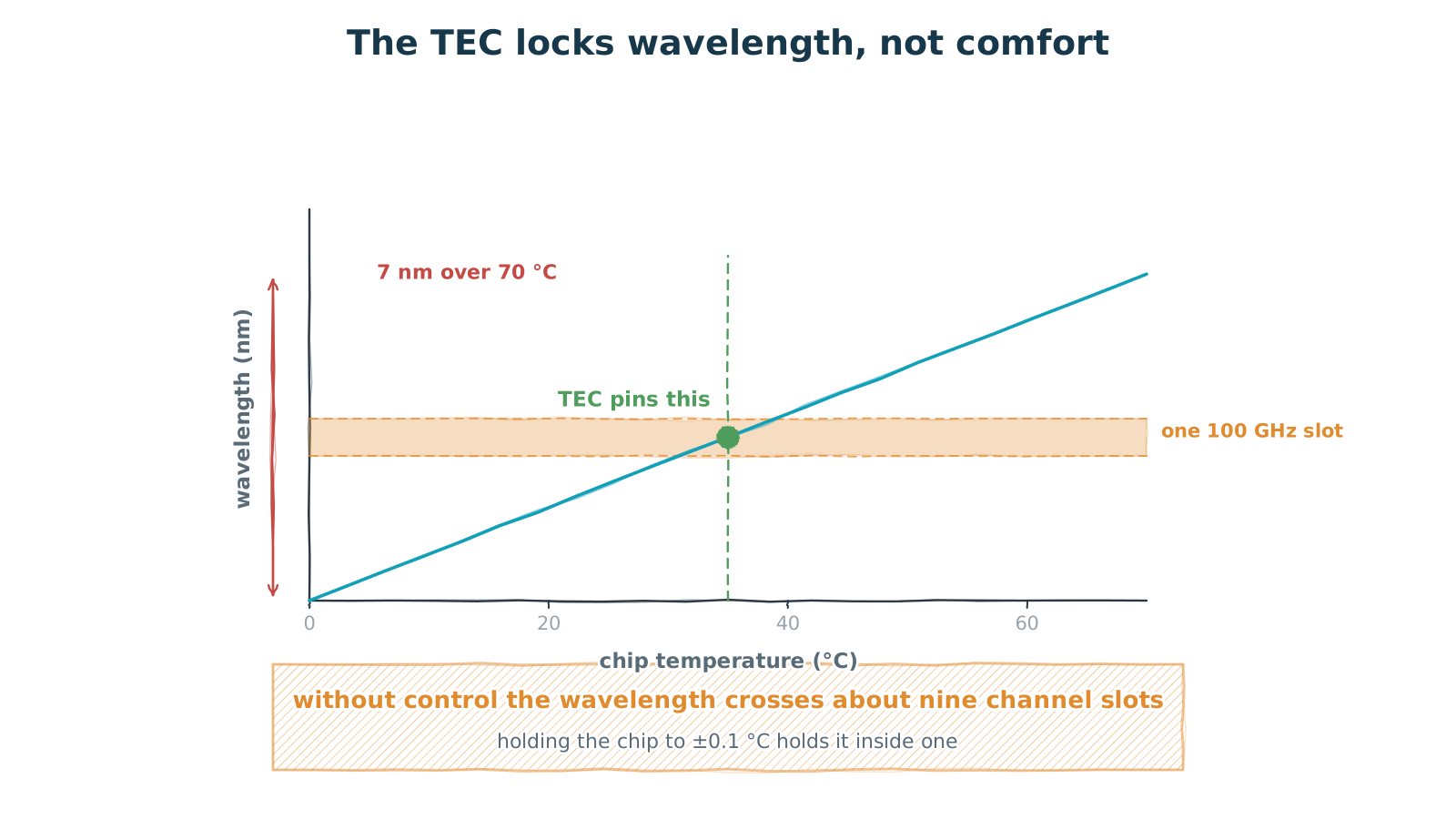
Figure 3 — The TEC locks wavelength, not comfort
0.1 nm per degree — seventy degrees is seven nanometres
The internal cooler is usually read as "keeping the chip cool". What it actually does is hold the wavelength still.
A distributed feedback laser drifts with chip temperature, typically around 0.1 nm per degree. That sounds small until it meets a wavelength-division system. A 100 GHz channel spacing corresponds to roughly 0.8 nm near 1550 nm, so the full 0 to 70 °C ambient span walks the wavelength across about 7 nm — nine channel slots. Unusable.
The cooler, with a thermistor sitting close to the chip, closes a loop that pins the chip at a set temperature. Hold it inside ±0.1 °C and the drift stays within one channel window. That is why the specification to look at is stability, not cooling capacity: how cold it can pull does not matter, how tightly it can hold does.
The same logic shows up elsewhere. Periodically poled lithium niobate modules carry a cooler and a thermistor too, and there they lock the phase-matching condition — which is to say, the output wavelength. Same structure, different thing being held.
4. Isolator and angled facet: two jobs
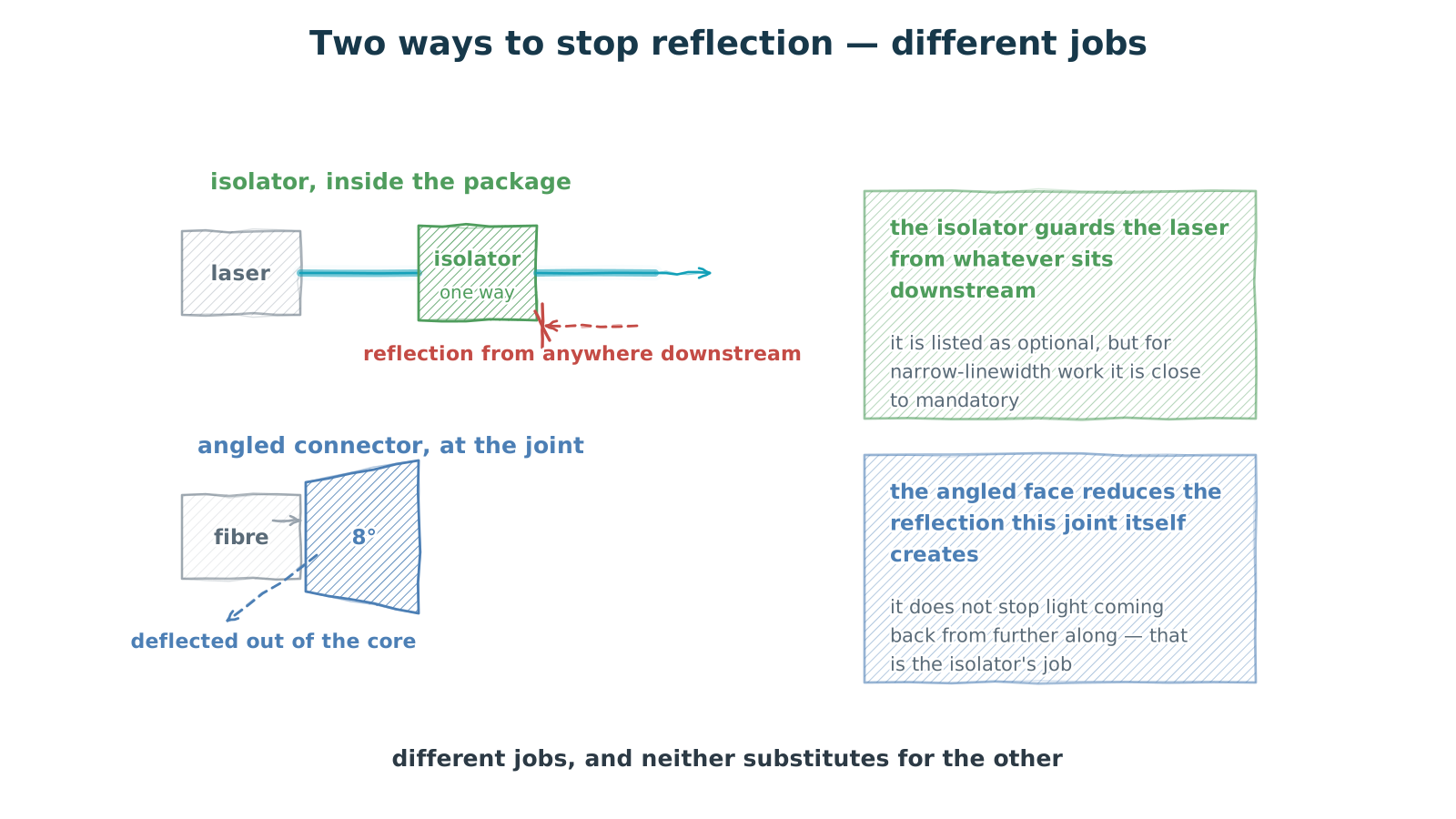
Figure 4 — Isolator and angled facet: two different jobs
one guards the laser, one cleans up the joint
Reflection is a recurring nuisance: light travelling back down the path into the laser raises relative intensity noise and makes the wavelength jitter. There are two ways to stop it, and they do different work — neither substitutes for the other.
An isolator sits after the chip, passing light forward and blocking it backward. It handles reflections generated anywhere downstream — connectors, splices, the far-end equipment. It is often listed as optional, but for narrow-linewidth work it is close to mandatory.
An angled connector does something else. It reduces the reflection this joint itself creates: with the end face cut at 8°, the interface reflection no longer travels back down the core but is aimed into the cladding. It does not stop light returning from further along — that is the isolator's job.
The distinction in one line: the isolator guards the laser; the angled face cleans up the joint. Both are commonly used at once, because they are not defending the same thing.
5. Why PM fibre is not optional
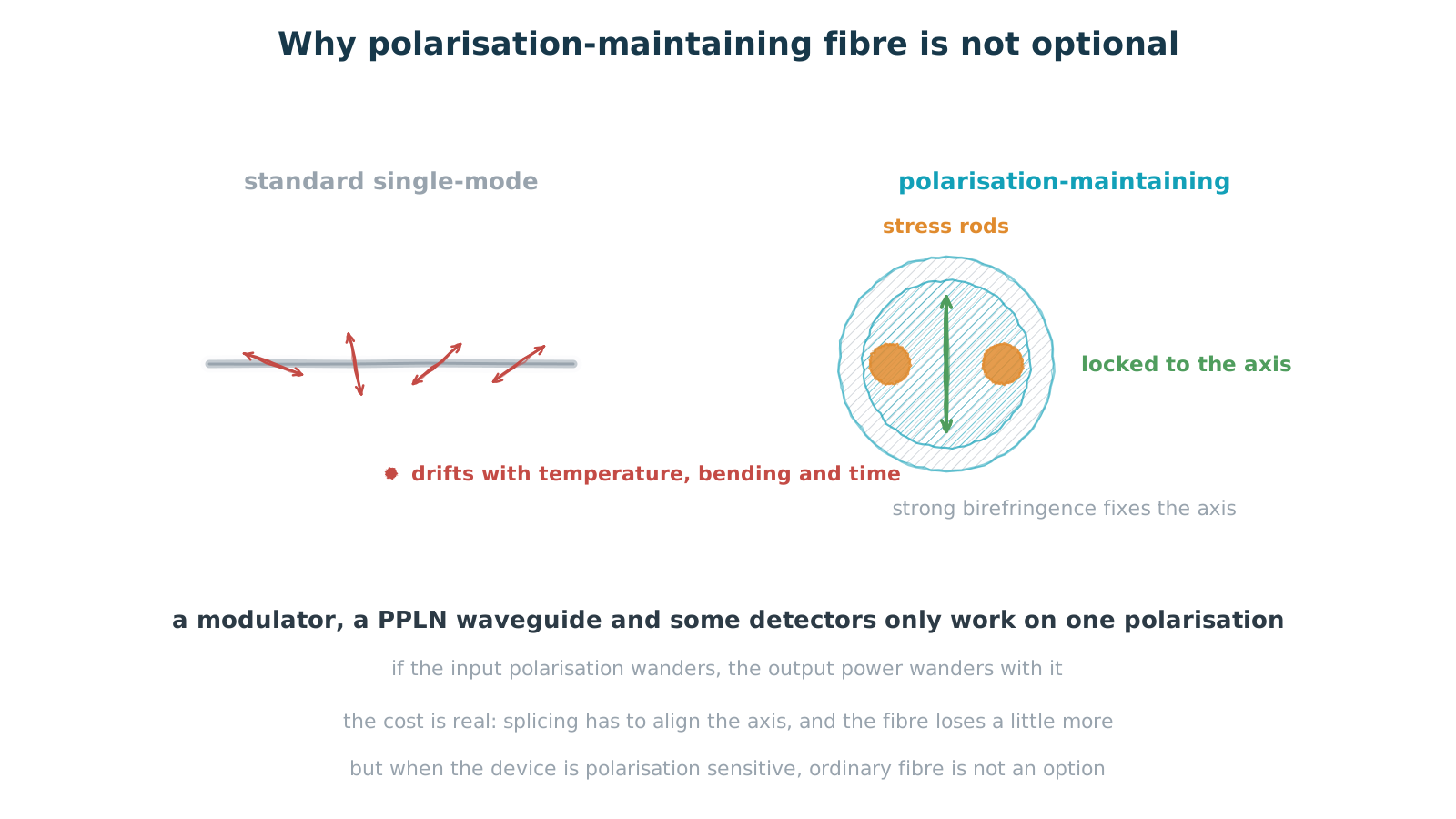
Figure 5 — Why polarisation-maintaining fibre is not optional
if the device cares, the input has to be defined
Last item: why the pigtail is polarisation-maintaining fibre rather than ordinary single-mode.
In standard single-mode fibre the state of polarisation is unconstrained. It wanders with temperature, with bending, and with time. For most communication links that does not matter. For a polarisation-sensitive device it does: modulators, periodically poled lithium niobate waveguides and some detectors only work on one polarisation. If the input polarisation drifts, the output power drifts with it — unpredictably, and with no way to calibrate it out afterwards.
Polarisation-maintaining fibre builds two stress rods either side of the core, creating a strong artificial birefringence. The propagation constants of the two orthogonal polarisations differ enough that light launched along one axis is held there: bending and temperature changes are not enough to push it onto the other.
The cost is real. Splicing has to align the axes, which is more work than an ordinary splice and loses more light, and the fibre itself attenuates slightly more. So it should only be used when the device genuinely cares — and in those cases it is not optional.
6. What to ask
Pulling it together, these are the items worth pinning down when reading a specification or placing an order.
Package and pinout — is it the conventional assignment, and does the board change if you switch supplier. RF connector type and rating — 2.92 mm series or higher, rated to what, and how far above the signal frequency. Cooler range and stability — what operating temperature span it covers, and whether it holds ±0.1 °C or ±1 °C; ask for power draw too, since it lands in the board thermal budget. Is there an isolator, and how much isolation — essential for narrow-linewidth work. Fibre and connector — maintaining or standard, angled or flat. Wavelength and accuracy — does it sit on a standard grid, and how far off.
One reminder on the cooler: ask for stability, not capacity. Pulling a chip cold is easy; holding it still is not, and only the second one matters to the wavelength.
Closing
Every part on a module like this was forced into existence by a specific piece of physics. Seven pins carry DC because RF cannot travel on a pin. The cooler is not about comfort but about holding wavelength. The maintaining fibre is not a premium option — the device genuinely cares about polarisation.
So the right way to read this kind of description is not as a list of features but as a translation exercise. For each item, answer one sentence: without it, what breaks? If you can answer that, the selection will not go wrong.
Seven pins carry DC and the RF takes its own port. The cooler locks wavelength, not temperature. The maintaining fibre locks polarisation, not light. Every line on the list is a consequence that would arrive if the part were missing.
Figures are hand-drawn vector schematics illustrating structure and principle; they do not represent the actual shape, dimensions or layout of any specific product.
Bandwidth, wavelength drift, temperature stability, connector rating and other figures quoted are illustrative or typical values for volume parts; actual numbers depend on device design and process platform.